
Discord vs Slack: the ultimate creator showdown
Published on November 19, 2025 · Reading time: 10 min
The real debate between Discord and Slack boils down to a single, fundamental difference in purpose: Discord is built for community, while Slack is built for business.
Discord shines when it comes to creating large-scale, interactive social hubs with fantastic voice channels. Slack, on the other hand, is fine-tuned for professional, asynchronous team collaboration, packing in deep integrations with workflow tools. Your choice hinges entirely on whether you're building a vibrant social ecosystem or streamlining your internal business operations.
Breaking down the core philosophies
Picking the right communication platform is a defining moment. The choice between Discord and Slack isn't just about features; it's about finding a platform whose DNA aligns with your goals. One feels like a sprawling, dynamic community centre, while the other operates like a highly structured digital office.
This core distinction ripples through every part of the user experience, from the interface right down to the moderation tools. Getting this part right is the first step to making a choice you won't regret.
A high-level look at each platform
To set the stage, let's zoom out and look at what each platform was originally designed to do.
- Discord's focus: Born out of the gaming world, it has since blossomed into a super versatile tool for just about any online community you can imagine. Its design prioritises real-time interaction, social buzz, and giving members a custom experience through roles and bots.
- Slack's focus: Built from the ground up for the workplace, its entire structure is geared towards productivity, project management, and plugging into other business tools. Its threaded conversations and powerful integrations make it the perfect fit for organised, task-focused communication.
You couldn't ask for a clearer contrast. Slack is designed for getting work done in a structured way. Discord is all about dynamic, free-flowing social interaction. This identity shapes everything, from the quality of the voice chat to the kinds of integrations on offer.
To make this even clearer, here's a quick side-by-side look at the essentials.
Quick comparison: Discord vs Slack
This table gives you an at-a-glance summary of the core differences between the two platforms, highlighting who they're for, what they're best at, and how they make money.
| Feature | Discord | Slack |
|---|---|---|
| Primary audience | Online communities, creators, gamers | Businesses, internal teams, startups |
| Best use case | Building large, interactive social hubs | Streamlining internal team communication |
| Core strength | Superior voice/video channels, community tools | Deep business integrations, threaded chats |
| Pricing model | Generous free plan, user-funded perks (Nitro) | Limited free plan, per-user business subscriptions |
It’s clear from the table that their target audiences and strengths rarely overlap, guiding you towards the right choice based on your primary goal.
Just look at Discord's homepage, which immediately tells you it's a place "where you can belong to a school club, a gaming group, or a worldwide art community."

This branding drives home its identity as a social-first platform. It's a world away from Slack's buttoned-up, business-centric messaging.
Comparing user experience and core features
Beyond the branding, the real story of Discord and Slack is told through the daily user experience. At first glance, they look almost identical: a sidebar for servers or workspaces, a list of channels, and the main conversation area. But spend five minutes in each, and you’ll feel their true DNA.
Slack is meticulously built for asynchronous work. Its text communication is polished, with every feature designed to create structure and make information easy to find later. In contrast, Discord’s design, a legacy of its gaming roots, is all about spontaneous, real-time social connection.
Communication flow and structure
The biggest point of friction in the Discord vs. Slack debate is how they handle conversations. Slack champions threaded conversations. This simple feature lets teams tuck discussions about a specific topic under a parent message, keeping the main channels clean and easy to follow. You can track multiple complex projects at once without everything turning into a chaotic mess.
Discord eventually added threads, but they often feel like an afterthought, not the default way to communicate. The platform's heart is a continuous, chronological chat log. It’s perfect for fast-paced, live conversations but can quickly become unwieldy when people are discussing multiple topics simultaneously.
Slack's design is purpose-built for productivity, prioritising organisation and clarity in every interaction. Discord's structure is optimised for social engagement and live events, creating a more fluid, albeit sometimes less organised, environment.
To address this, Discord rolled out Forum Channels. This clever feature brings a more structured, forum-like experience into your server. It’s a direct answer to one of Slack's biggest strengths, giving communities a dedicated space for organised discussions that don’t get buried in the live chat.
Voice and video: a tale of two philosophies
Nowhere is the difference between these platforms clearer than in their approach to voice and video. This is where Discord truly shines.
Discord was built from the ground up around persistent, low-latency voice channels. You can just drop in and out of them whenever you like, creating a casual, "always-on" vibe that’s perfect for co-working or just hanging out. The audio quality is fantastic, and you get granular control over individual user volumes—a small but critical detail for large groups.
Slack offers Huddles, which try to mimic this drop-in feel, alongside standard video calls. But in practice, many users find the performance less reliable, often pushing businesses to stick with dedicated tools like Zoom. If voice is central to your community, Discord is the undisputed winner.
- Discord's approach: Treat voice like a room you can enter and leave at will. It's designed for spontaneous connection and co-working.
- Slack's approach: Treat voice like a call you initiate. It's more formal and less central to the daily experience.
File sharing and search
When it comes to digging up old information or sharing files, Slack's business focus gives it a clear edge. Its free plan comes with a major catch: a 90-day message history limit. However, upgrading to a paid plan unlocks unlimited history and a seriously powerful search function that makes finding old messages and files a breeze.
Discord is far more generous on this front, offering unlimited message history completely free—a massive plus for communities. Its search function gets the job done but is less advanced than Slack's, making it harder to pinpoint specific information in a large, busy server.
Their file-sharing limits also reveal who they're built for.
| Feature | Discord (free plan) | Slack (free plan) |
|---|---|---|
| Max file upload size | 25MB per file | 1GB per file |
| Total storage limit | Unlimited | 5GB total workspace storage |
| Message history | Unlimited | Limited to the last 90 days |
The takeaway here is pretty clear. Slack is built for sharing large work files but puts long-term access behind a paywall. Discord gives you permanent archives for free but nudges you towards its paid Nitro subscription for larger uploads. The right choice really depends on what you value more: keeping your history or handling big professional assets.
Breaking down the price tag: how Discord and Slack make money
Figuring out the true cost of Discord vs Slack is a huge part of the decision. The prices on the tin only tell you half the story. The real value is hidden in what each platform gives away for free and how their paid plans fit with what you’re trying to build—whether that's a small startup team or a sprawling paid community.
Right out of the gate, Discord looks like the obvious choice if you’re watching your budget. Its free plan is incredibly generous, handing you pretty much all the core features a community needs without putting up frustrating walls. The biggest one? Unlimited message history, a feature Slack keeps locked behind a hefty paywall.
The great freemium divide
Slack's free plan isn't really built for long-term communities; it's more like a trial for businesses. The most painful limitation is the 90-day message history cap. Any conversation, file, or decision made more than three months ago simply disappears into the ether. That makes it a non-starter for anyone trying to build a lasting knowledge base or community archive.
Discord, on the other hand, was built from the ground up as a community-first platform. Servers are free to create and operate with almost every essential feature unlocked from day one. This philosophical difference is the key to understanding their entire pricing model.
The core difference is simple: Slack charges businesses per user for productivity tools. Discord makes its money from individual users who willingly pay for cosmetic and functional perks. This makes Discord almost entirely free for you, the community owner, and shifts the cost to your most engaged members.
This user-funded approach is a massive advantage for creators. Instead of facing a scary monthly bill that climbs with every new member, you can run a huge, active server for free. Your income comes from the value you create, not from paying for the platform itself.
Paid plans and monetisation: two different worlds
When you do decide to open your wallet, what you get for your money couldn't be more different.
Slack’s paid plans—Pro and Business+—unlock features that businesses need, like unlimited message history, more app integrations, and advanced admin tools. The catch is that the cost is calculated per active user, per month. For a large community, this can get wildly expensive, fast. A community of just 50 members on the Pro plan could easily set you back thousands of pounds a year.
Discord’s monetisation strategy is completely different. It’s all about enhancing the user experience, not unlocking core functions. This happens in two main ways:
- Discord Nitro: A personal subscription that any user can buy for themselves. It gives them perks like better quality video streaming, much larger file uploads (up to 500MB), and the ability to use their favourite custom emojis on any server. The benefits are for the individual user, not the server itself.
- Server Boosting: This lets your most passionate members "boost" your server. As the server collects more boosts, it unlocks perks for everyone in the community—more emoji slots, higher audio quality for voice channels, and custom branding like banners and invite links.
This creates a powerful, collaborative dynamic. You build a great community, and your biggest fans voluntarily pay to make the experience even better for everyone. It feels much more organic and community-driven than a mandatory platform fee.
Here’s a simple breakdown of what your money buys on each platform:
| Feature unlocked | Slack (paid plans) | Discord (Nitro & Boosting) |
|---|---|---|
| Primary goal | Unlock core business productivity features | Enhance the social and community experience |
| Who pays | The organisation (per user, per month) | Individual users (for personal perks or to support a server) |
| Key benefit | Unlimited message history, more integrations | Better emojis, higher video quality, larger uploads |
| Cost structure | Scales with member count, can become very costly | Optional for users, free for server owners |
For creators looking to build a paid community, the choice is pretty clear. Slack’s per-user pricing model is fundamentally at odds with the goal of growing a large member base without breaking the bank. When it comes to Discord vs Slack on cost, Discord’s robust, free foundation is the perfect launchpad for monetisation, leaving you free from any burdensome overhead.
Community management and moderation capabilities

You can tell what a platform is really for by looking at how it handles safety and member management. This is where the core philosophies of Discord and Slack really split apart.
Slack is built for internal company governance. Discord, on the other hand, was born to manage huge, public-facing communities and comes loaded with a powerful suite of native tools to do just that.
Slack’s admin controls are simple but limited. A company owns the workspace, and admins can manage members, permissions, and integrations. This works perfectly when you're dealing with a trusted internal team where the goal is productivity, not policing bad behaviour. But it just doesn't have the sophisticated, proactive tools you need to fight spam, raids, or filter content at scale.
Discord is a different beast entirely. Its entire system assumes your server will have thousands of members who don't know each other, meaning you need a serious defence system from day one.
Discord's role-based permission system
The whole foundation of Discord moderation rests on its powerful role-based permission system. Instead of a simple admin vs. non-admin setup, you can create an unlimited number of custom roles, each with its own mix of over 30 different permissions.
This lets you build a proper hierarchy of control. You can set up roles for new members with limited permissions, trusted regulars who can share images and links, and moderators who can kick, ban, or mute users. This kind of granular control is absolutely essential for structuring a community and stopping chaos before it starts. For a deeper dive, check out our guide on how to build a professional Discord server .
Automation and the bot ecosystem
Where Discord truly leaves Slack in the dust is with automation. The platform has a native tool called AutoMod, which automatically scans for and blocks messages with specific keywords, spam links, or dodgy content before anyone even sees them. Think of it as your 24/7 first line of defence.
Beyond AutoMod, Discord’s open API has spawned a massive ecosystem of third-party moderation bots. These bots can do everything from welcoming new members to handling complex jobs like:
- Automated warnings and mutes: Bots can track user behaviour and dish out escalating punishments for rule-breakers automatically.
- Anti-raid protection: Specialised tools can detect a coordinated spam attack and instantly lock down the server.
- Verification gates: You can require new members to solve a CAPTCHA or agree to rules before getting full access, which is great for filtering out bots and trolls.
This is a fundamentally different approach to Slack, which pretty much relies on admins to handle every issue by hand.
Slack gives you the tools to manage a team; Discord gives you the arsenal to defend a city. The mindset shifts from internal trust to public safety, and the tools reflect that perfectly.
This community-first focus has fuelled Discord's incredible growth, especially in places like France, where it has become a major platform. Its popularity among French Gen Z and millennials is huge, with 42% of Gen Z internet users in the country using it every week. This isn't just about gaming anymore; the rise of non-gaming communities has led to a 14% year-over-year jump in voice chat usage as people connect over creative projects and professional networking. You can get more insights on Discord's global user trends over at sqmagazine.co.uk .
Integrations: business engine vs. community sandbox
A platform’s true power often lies in how well it plays with the other tools you use every day. This is where the core philosophies of Slack and Discord—business-first versus community-first—really come into focus. It’s not just about the number of integrations; it’s about their fundamental purpose.
Slack is built to be the central nervous system for a business. It offers a massive, curated marketplace with over 2,600 official app integrations. These aren't just simple notification bots; they are deep connections to business-critical tools like Jira , Google Drive , Salesforce , and Asana . The whole idea is to pull your work into Slack, cutting down on the constant app-switching that kills productivity.
Imagine a marketing team's channel where updates from their project management tool pop up automatically, Google Docs comments are posted for review, and new leads from their CRM are announced in real-time. It creates a seamless operational hub where talking and doing are one and the same.
Slack: the business workflow engine
Slack’s integrations are laser-focused on optimising professional processes. They enable complex automations where an action in one app triggers a whole sequence of events inside Slack. You can approve expense reports, assign tasks, or launch a video meeting right from a chat message. This relentless focus on efficiency is exactly why it’s a staple in the corporate world.
It has carved out a strong presence in the French business sector, becoming a go-to for organisations of all sizes. Globally, nearly 80% of Fortune 100 companies use Slack, and this trend holds true for French enterprises, especially those with 20–49 employees. French organisations using Slack report a 32% drop in email usage and an impressive 340% increase in ROI, showcasing its real-world impact. You can dig into more stats about Slack's business impact over at colorlib.com .
Slack's entire integration philosophy is about bringing your professional toolkit into a single, unified workspace. It’s designed to make teams more efficient by centralising information and automating repetitive business tasks.
Discord: the community engagement sandbox
Discord takes a completely different road. Its ecosystem isn’t about hooking into Salesforce or Jira; it’s all about customising the community experience with bots and webhooks. While Slack has its official marketplace, Discord’s strength is its massive, community-driven library of third-party bots built on its open API.
These bots are less about workflow and more about fun, engagement, and moderation. They add interactive layers to your server, creating experiences that just aren't possible on Slack.
Here’s what Discord bots are typically used for:
- Automated moderation: Bots like MEE6 or Dyno can automatically filter spam, warn rule-breakers, and manage member roles, keeping your community safe and orderly.
- Interactive games and levelling: Many bots add a gamified feel, letting members earn XP and "level up" just by being active. It’s a simple but powerful way to encourage participation.
- Custom welcome messages: Greet new members with personalised messages, assign them starter roles, and point them towards the server rules.
- Music and content sharing: Bots can stream music from YouTube into voice channels or pull in content from Reddit and Twitter feeds automatically.
The difference here is stark. Slack gives you polished, official integrations designed to make a business run smoother. Discord, on the other hand, provides a flexible, open sandbox for creating unique social tools that build culture and keep people coming back. Your choice really depends on what you're trying to achieve: streamlining a business workflow or building a vibrant, interactive community.
Making the right choice for your paid community
When you're building a subscription-based community, your choice of platform is more than just a technical detail—it's a foundational business decision. You're asking members to pay for access, so the entire experience needs to feel premium, engaging, and worth every penny. This is where the Discord vs Slack debate gets serious, and frankly, one platform is just built for this modern business model.
While Slack’s professional polish can be tempting, its whole structure is designed for internal business teams, not paying community members. The real deal-breaker is its pricing model: a per-user, per-month fee. As your community grows, your platform costs will skyrocket, eating directly into your profits before you even get a chance to scale.
Why Discord is built for monetisation
Discord completely flips the monetisation model. For you, the creator, the platform is fundamentally free to operate. There are no escalating per-user fees that punish you for growth. This means you can build a massive, thriving community without the constant worry of a crippling monthly bill.
This cost-efficiency is a true game-changer. The revenue you generate from subscriptions goes back into your business—creating more value for your members—not just paying rent on the digital space you occupy.
For a paid community, the platform should be an asset, not an expense. Discord’s free, feature-rich foundation lets you focus entirely on member value and revenue generation, while Slack's model forces you to constantly weigh growth against rising operational costs.
This decision tree nails the core difference based on what you’re trying to build.
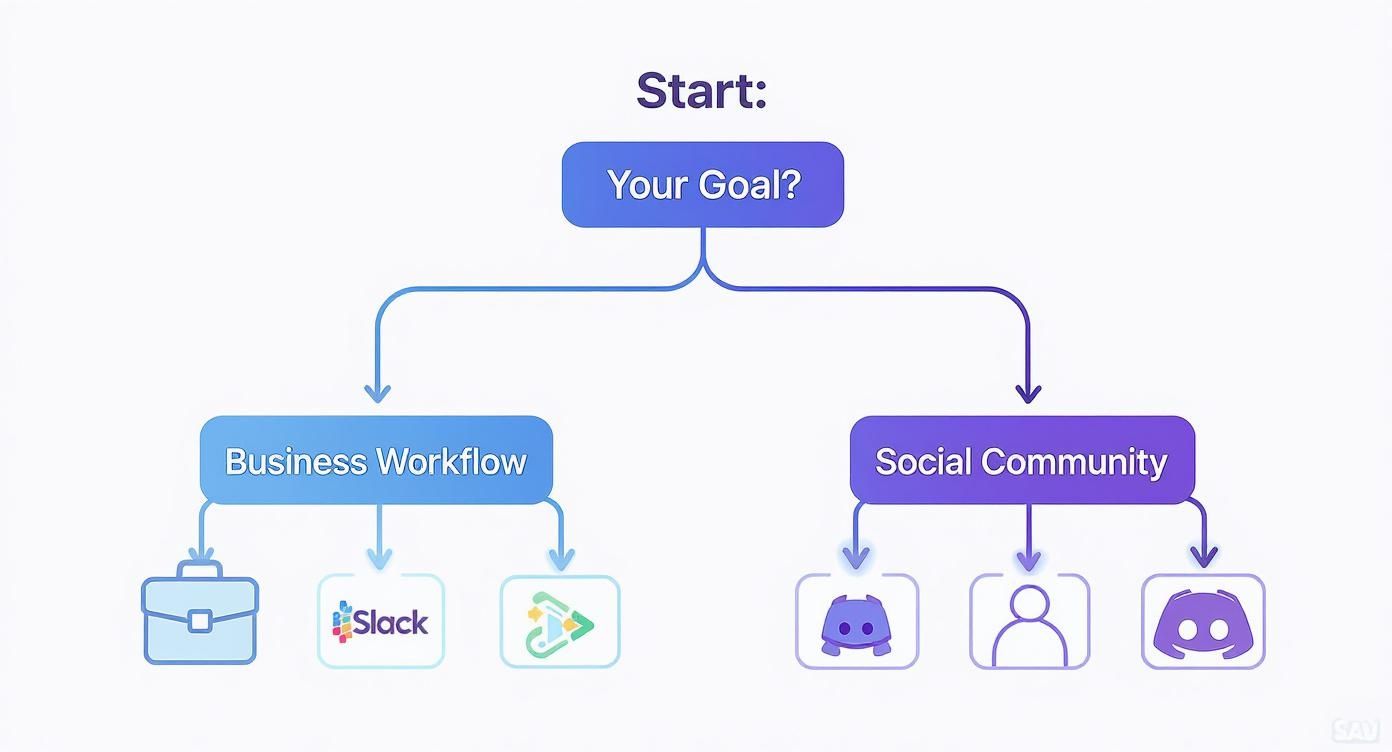
It’s clear: if your goal is building an interactive social space—the heart of any paid community—Discord is the purpose-built tool for the job.
Seamlessly integrating payments with Discord
The real magic happens when you connect a monetisation tool directly to your Discord server. This is where a platform like Join My Thread steps in. These services handle the entire member lifecycle for you, creating a professional and completely seamless experience for your subscribers.
Here’s how this powerful combination works:
- Automated access control: When a member successfully subscribes on your payment page, they instantly get an invite and are granted access to your private Discord server.
- Effortless member management: If a member cancels their subscription or a payment fails, the system automatically removes them from the server. This puts an end to the manual grind of cross-referencing payment lists.
- Secure and scalable: This automated workflow ensures only paying members have access, securing your premium content and allowing your community to grow without hitting administrative bottlenecks.
By pairing Discord’s powerful community features with an automated monetisation layer, you create a robust business engine. This setup doesn't just save you countless hours; it delivers a professional onboarding and offboarding experience that builds trust and keeps members around. For any creator serious about building a sustainable subscription business, Discord is the undisputed winner.
A few lingering questions
Even with a detailed breakdown, you probably still have a few practical questions bouncing around. It's one thing to compare features, but another to figure out how these platforms work in the real world. Let's tackle the most common concerns to help you make that final call.
Is Discord secure enough for business use?
This is a big one, especially for teams eyeing a move from Slack. The short answer is: it depends on your needs. Slack was built from the ground up for the corporate world, offering enterprise-grade security like SSO and data residency controls on its pricier plans. It’s designed for airtight administrative oversight.
Discord’s approach is different, but it’s still solid for many businesses. You get essential security tools like two-factor authentication (2FA), server verification levels to stop raids, and a powerful role-based permission system to lock down who sees what.
The main catch is that Discord’s direct messages (DMs) exist outside of your server's control. A company just doesn't have the same level of oversight as they would in Slack, where every conversation is contained within the workspace. For most internal teams not handling super-sensitive data, Discord is perfectly fine. But if you're in an industry with strict compliance rules, Slack’s business-centric features give it the edge.
How well does each platform scale for large communities?
When it comes to sheer numbers, this isn't even a contest. Discord is the undisputed champion of scale. A single server can theoretically handle up to 1 million members, though you might see some performance hiccups at those extreme numbers. Its entire architecture, especially for voice channels, is built to handle thousands of people interacting at once.
Slack, on the other hand, was never designed for massive public communities. Yes, its top-tier Enterprise Grid plan can support up to 500,000 users, but the per-user pricing makes that option financially impossible for pretty much any community. For any creator, brand, or group expecting serious growth, Discord wins hands down.
The core takeaway here is about intent. Discord is engineered for huge social gatherings, making it perfect for creators and sprawling fanbases. Slack is built for organisational scaling, helping companies manage internal teams, not a massive public audience.
What are the biggest challenges when migrating a community?
Moving an established community is a massive project, no matter which direction you're going. The hardest part is always preserving your culture and, just as importantly, your conversation history. With Slack's 90-day message limit on the free plan, exporting a full archive without paying is a real headache.
On the flip side, migrating from Slack to Discord often means giving up the neat, threaded conversations that business teams love. The key to a successful move is managing expectations. Be transparent about why you’re making the switch, create clear guides, and give your members time and support to adapt to their new home.
Ready to build your paid community on Discord without the administrative nightmare? Join My Thread gives you the tools to automate payments and member management, letting you focus on what you do best. Set up your paid community in minutes!